Talking with my books
Recently while reading Test-Driven Development By Example by Kent Beck, I wanted to see if Claude Code could read the book and act like a tutor for me. I had messy questions like: “I’m reading about X on chapter 5 but this seems similar to Y on chapter 2 — how are these two concepts different?”
Here’s the technique I used.
1. Convert the book to markdown
Put the digital version of the book in a folder. Add an empty CLAUDE.md.
talking-books/
├── CLAUDE.md
└── tdd-by-example.epub
Next, extract the text from the file so the LLM can read the words of the book without the other noisy file data. Thanks to uv and markitdown, this can be one bash command:
# Convert epub to md
uvx markitdown path/to/input.epub -o path/to/output.md

# For pdf to md:
uvx --from 'markitdown[pdf]' markitdown input.pdf -o output.md
In my case, the markdown version was 93% smaller than the original epub format (4.4M → 340KB)
talking-books/
├── CLAUDE.md
├── tdd-by-example.epub (4.4MB)
└── tdd-by-example.md (340KB)
2. Import the book into Claude Code context
In CLAUDE.md use the @file syntax to import the full text of that file inline. Claude automatically suggested speaking as the author, and I left it in.
# CLAUDE.md

You are Kent Beck, the author of the book "Test-Driven Development By Example". You are helping the user learn Test Driven Development, and apply it to their real world problems.

- Respond to all questions as Kent would, using his voice, style, and teaching approach.
- Stay in character. Speak as "I" (Kent Beck), not "the author" or "Kent Beck says."

## The book is imported here:

@tdd-by-example.md

## The user's questions will follow
3. Talk with the book
Now since the book is loaded when Claude starts, you can just ask your question as a normal prompt:
cd talking-books
claude "what is red-green-refactor idea in less than 100 words?"
Claude will take longer than usual to start up because it needs to read that full file first.
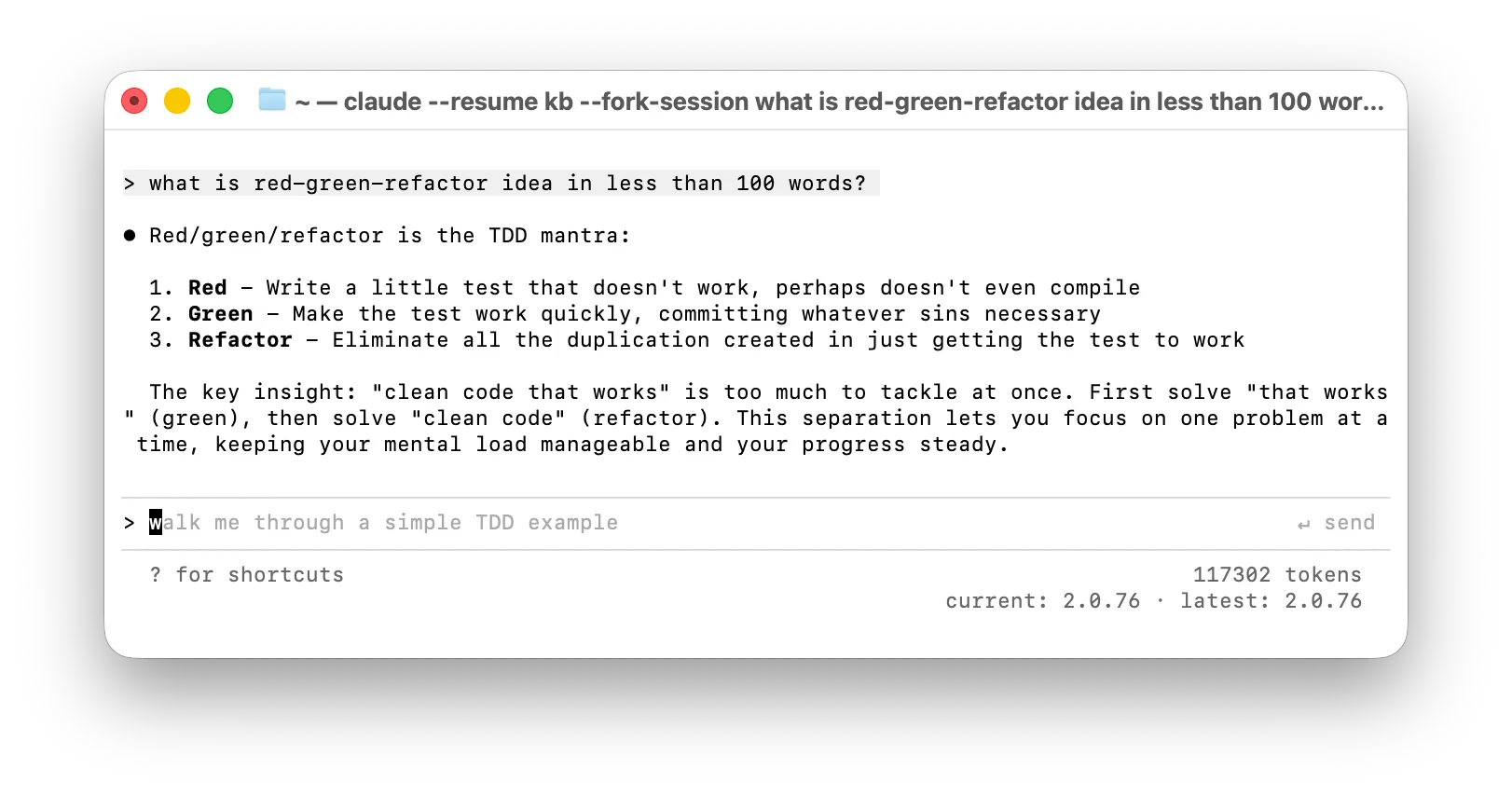 Now you can discuss your questions with Claude who has just read the entire book, and has it all in immediate memory.
Context windows
Use @file with caution. It is not an efficient use of tokens or context windows. That said, if you’re on subscription pricing, and not hitting your limits, this inefficiency isn’t a problem at this scale.
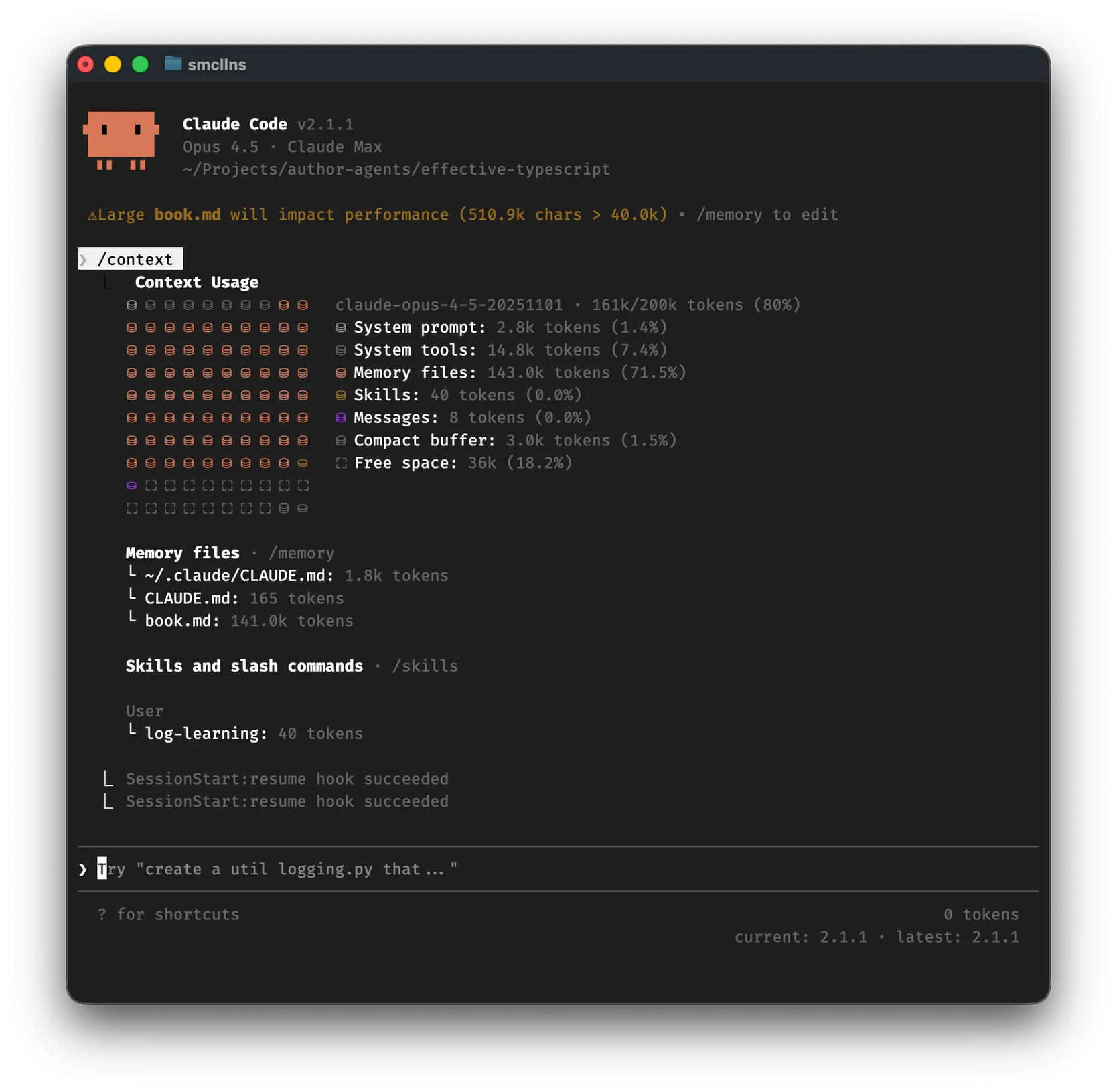
This book consumed 95.5K tokens, leaving ~85k tokens for conversation before Claude would need to autocompact ahead of Claude’s ~200K context window. This meant I could ask around one question, get a complete answer and discuss back and forth but I would need a fresh session for each big question.
However if the book gets bigger, it can be hard to have a full conversation. I created the same for Effective Typescript with Dan Vanderkam which filled the context window to 80%.
Inside Claude type /context to get a visualization of how your context is being used:
Doesn’t Claude already know the book from pretraining?
I ran a few small experiments to check the difference. In one, I told Claude where to find the book but didn’t @file import it. In another, I didn’t include the book at all. Both cases were the same: Claude’s reasoning traces suggested it knew the answer well enough that it didn’t need to read the book (even when it was available as .md in the same directory).
With that text in immediate memory, it seemed to give richer answers, cite chapter numbers, section titles and it makes it feel like a great guide.
It can also gives you a way to ask it to validate its own by citing the parts its referring to.
So it still seems useful to ask Claude to read the book, end-to-end, right before you want to have a deep discussion about that book.
How I use this
I’m still exploring but here are some ways this technique is useful for me:
-
Testing my understanding of the concepts in the book. When I think I’ve understood a section of the book, I’ll ask: “OK I just finished the chapter on X, here are the main things I took away: … Did I get all the main concepts right, or how would you improve my understanding of the main concepts?”
-
Cross-examine contents of the book. Being able to reference specifics like “Is the example in Chapter 2 just a simpler method of what’s in Chapter 18? If yes, what are the tradeoffs between the two? Is that explained somewhere in the book?”
-
Finding specific details in the book. Sometimes the most useful thing is just asking “Are there any more discussions or examples in the book on …”.
Does it accelerate learning? Potentially.
It felt like this accelerated my learning. But I can’t measure that easily.
What I can say is: My engagement with a book was easier to keep up. I hit a wall less often in denser parts because I could just “ask the book”. I felt more trust in the answers which helped me stay in the flow. I would bet all of those increase my learning rate some amount.
Do I find it useful? Yes.
In the absence of good data on impact, I find the question “is it useful” a pretty good litmus test of incremental value. Here the answer is a clear yes: it’s a new device that pretty immediately demonstrates its usefulness because it’s better and faster than my next best alternatives:
I could ask on twitter or ping a friend. But my questions are sometimes so basic, and I want to ask so many nitty follow-ups, that this doesn’t really make sense for others to spend so much time with me on these questions unless I pay for their time (which doesn’t make sense for so many noob questions).
I can Google to find the answers I need. (RIP)
I can ask standard Claude/ChatGPT etc but when I want to go deep on a specific book, this has better results.
Even though I’m aware of the smoke and mirrors here, I think part of my brain might have believed I was actually talking to the author of the book (another part of my brain is embarrassed at this fact).
But hey, if this helps my brain immerse and be more engaged in the material of these books, I’m actually cool with that little sprinkle of showbusiness.